Android SDK Setup
AppsOnAir AppLink helps you manage deep links and in-app routing seamlessly in your Android app. With a simple integration, you can configure, manage, and respond to links either from the web dashboard or directly through the mobile app SDK in real time.
To integrate the AppsOnAir AppLink Android SDK into your native Android apps, follow the steps below or watch the full video tutorial.
Basic Requirements for Service Usage
- Make sure to configure the App ID properly. For additional information Getting started
- Before getting started, ensure your AppLink Configuration is set up.
- Install or update Android Studio to its latest version.
- Make sure that your project meets these requirements:
- Android Gradle Plugin (AGP): Version 8.0.2 or higher
- Kotlin: Version 1.7.10 or higher
- Gradle: Version 8.0 or higher
Add AppsOnAir AppLink in Gradle Plugin and SDK
When creating a new project from Android Studio Arctic Fox (or newer) the allprojects{...} is no longer added in the project level gradle, so you need to add it in settings.gradle
- Groovy
- Kotlin
dependencyResolutionManagement {
   repositoriesMode.set(RepositoriesMode.FAIL_ON_PROJECT_REPOS)
   repositories {
       ...
       maven { url 'https://jitpack.io' }
   }
}
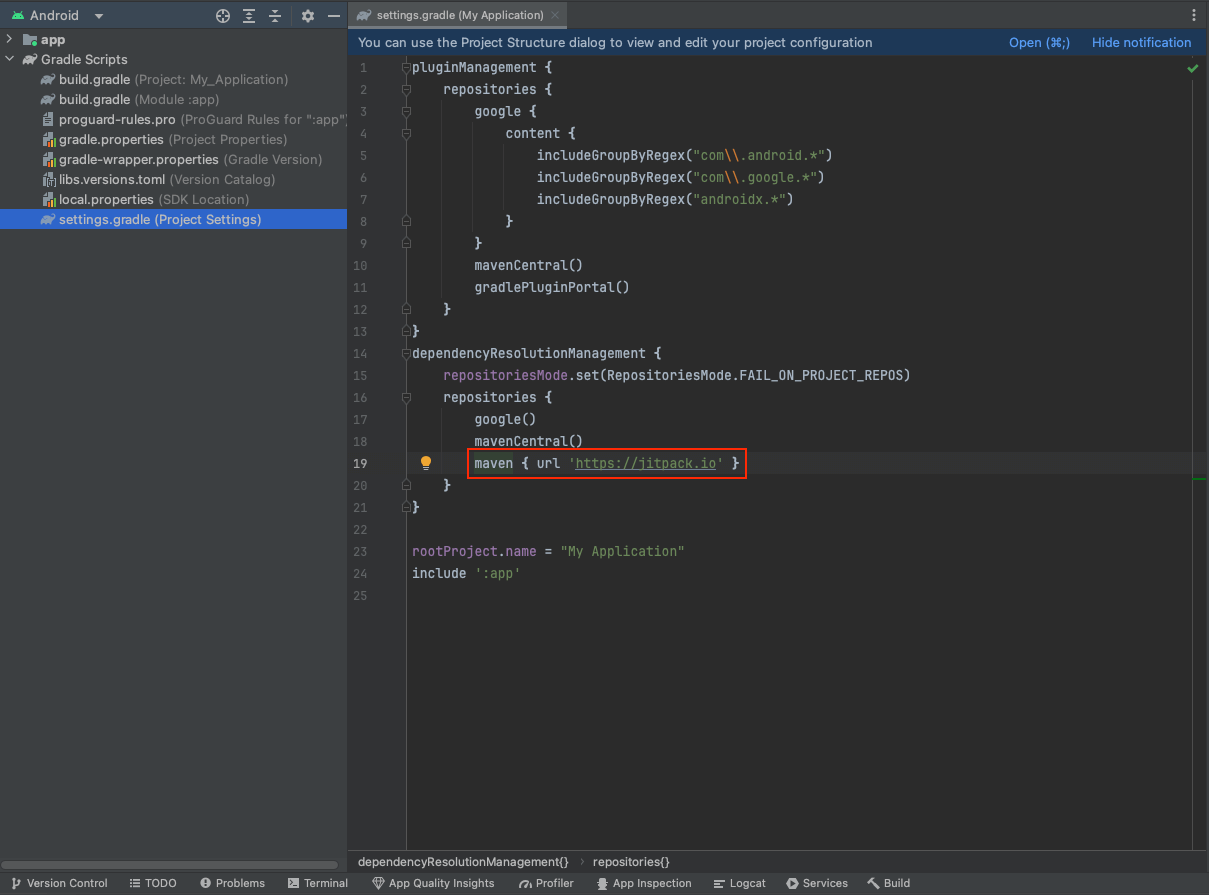
dependencyResolutionManagement {
   repositoriesMode.set(RepositoriesMode.FAIL_ON_PROJECT_REPOS)
   repositories {
       ...
       maven("https://jitpack.io")
   }
}
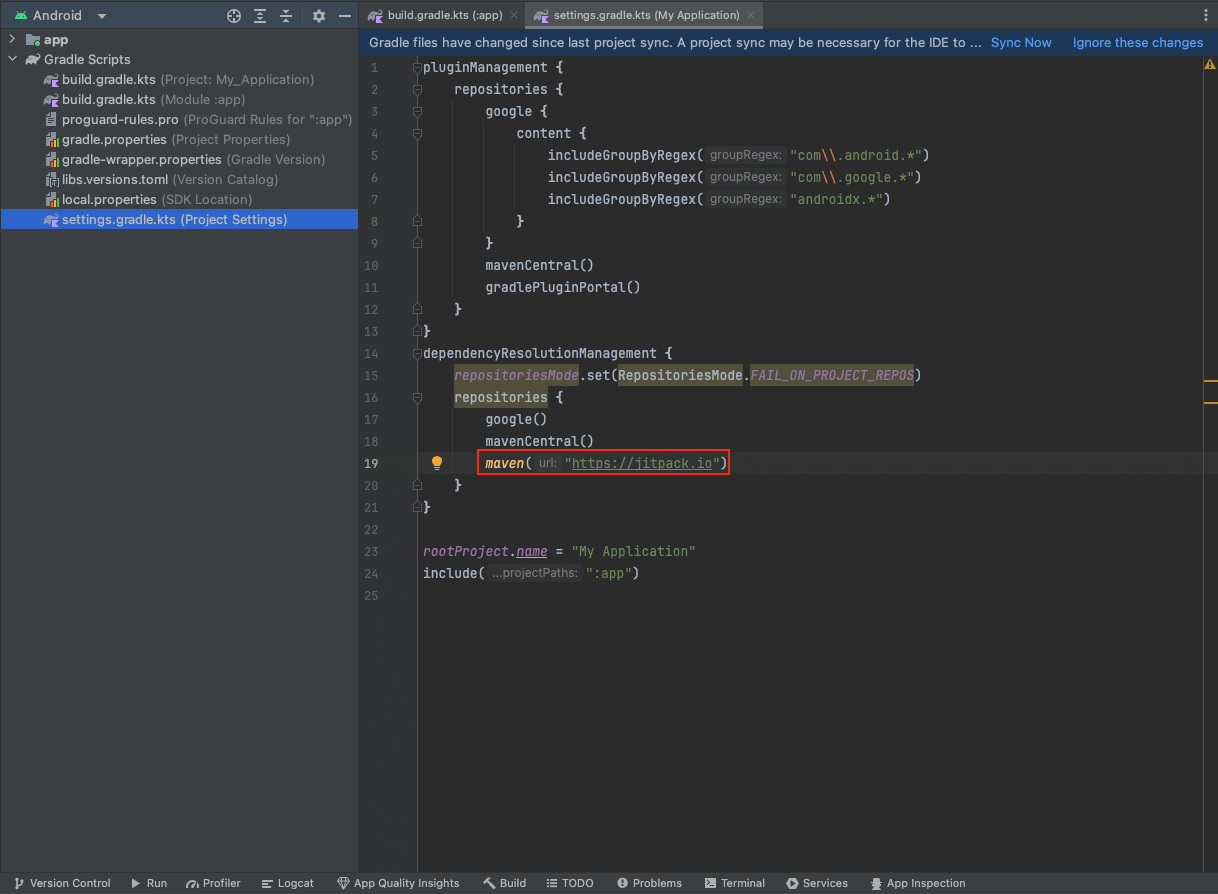
android.useAndroidX = true
android.enableJetifier = true
Open Your Root build.gradle File and Add the Following
- Groovy
- Kotlin
    allprojects {
    repositories {
            ...
      maven { url 'https://jitpack.io' }
    }
  }
    allprojects {
    repositories {
            ...
      maven("https://jitpack.io")
    }
  }
Add the Following to Your dependencies Section 
    [versions]
    appsonairAndroidApplink = "Tag" // latest version

    [libraries]
    appsonair-android-applink = { module = "com.github.apps-on-air:AppsOnAir-Android-AppLink", version.ref = "appsonairAndroidApplink" }
    dependencies {
      implementation(libs.appsonair.android.applink)
  }
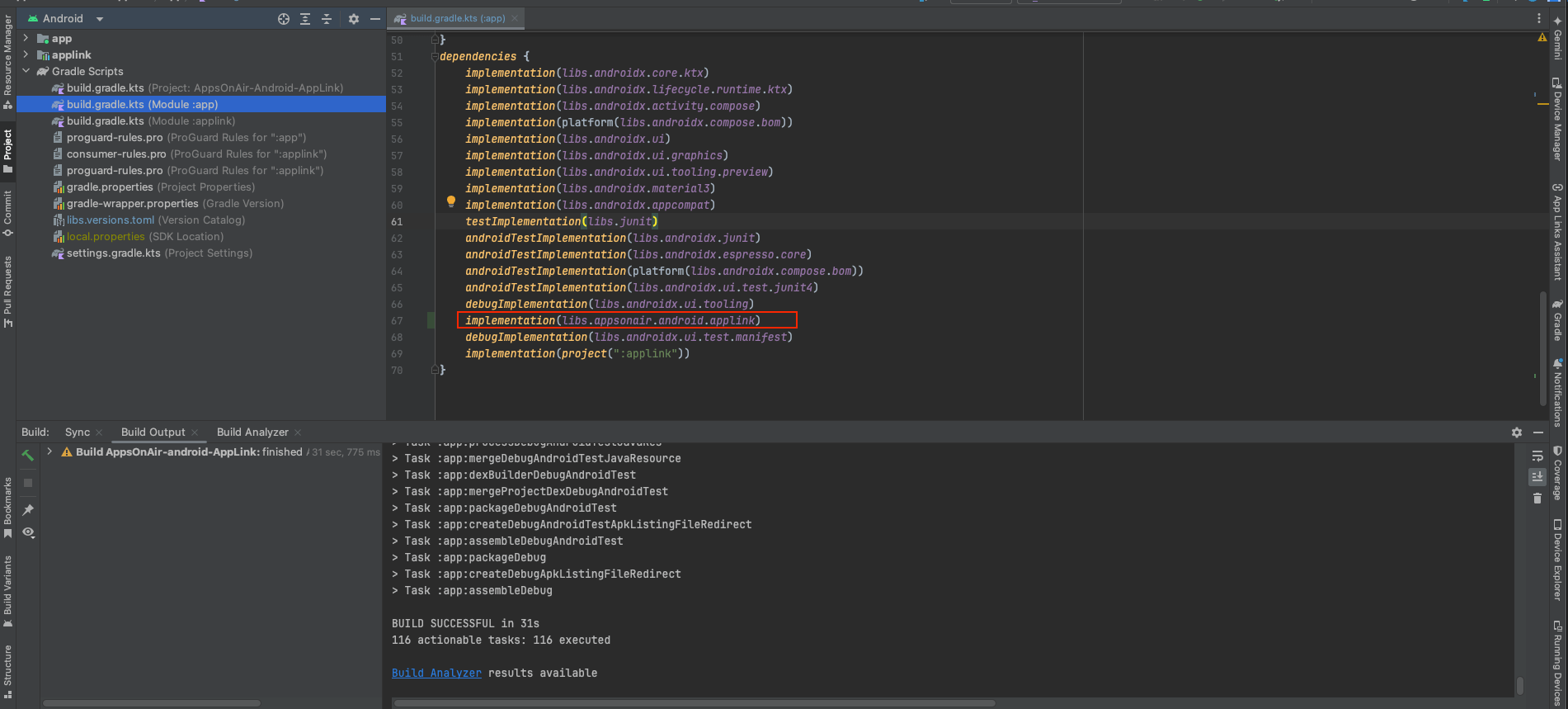
Make sure to press "Sync Now" on the banner that pops up after saving!
Add Required Code
- Add the below code to the app's AndroidManifest.xml file under the activity tag of your main activity.
<intent-filter android:autoVerify="true">
   <action android:name="android.intent.action.VIEW" />
   <category android:name="android.intent.category.DEFAULT" />
   <category android:name="android.intent.category.BROWSABLE" />
    <data
     android:host="your domain"
     android:scheme="https" />
</intent-filter>
- Add the below code if you are using a custom URI scheme.
<intent-filter>
    <action android:name="android.intent.action.VIEW" />
    <category android:name="android.intent.category.DEFAULT" />
    <category android:name="android.intent.category.BROWSABLE" />
    <data
     android:host="open"
     android:scheme="your scheme" />
</intent-filter>
Initialize the AppLink Service
To initialize the AppLink we recommend adding the initialization code within the onCreate method of your Main Launcher Activity (MainActivity).
- Kotlin
- Java
import com.appsonair.applink.interfaces.AppLinkListener
import com.appsonair.applink.services.AppLinkService

class MainActivity : AppCompatActivity() {
    private val TAG = "MainActivity"
    private lateinit var appLinkService: AppLinkService
   override fun onCreate(savedInstanceState: Bundle?) {
        super.onCreate(savedInstanceState)

        // Initialize deepLink service and set listener for deep link and attribution events
        appLinkService = AppLinkService.getInstance(this)
        // Initialize the AppLink to track the deepLink
        appLinkService.initialize(this, intent, object : AppLinkListener {
            override fun onDeepLinkProcessed(uri: Uri, result: JSONObject) {
                 // Handle deep link here
            }

            override fun onDeepLinkError(uri: Uri?, error: String) {
                // Handle error when deep link processing fails
            }

            override fun onAttributionListener(result: JSONObject) {
                 // Handle attribution here.
            }
        })
    }
    override fun onNewIntent(intent: Intent) {
        super.onNewIntent(intent)
        appLinkService.handleDeepLink(
            intent,
            "com.example.appsonair_android_applink" // Replace with your app's package name
        )
    }
}
import com.appsonair.applink.interfaces.AppLinkListener;
import com.appsonair.applink.services.AppLinkService;

public class MainActivity extends AppCompatActivity {
 private AppLinkService appLinkService;
 private String deepLinkUrl = "";


 @Override
 protected void onCreate(Bundle savedInstanceState) {
     // Initialize deeplink service and set listener for deep link and attribution events
     appLinkService = AppLinkService.Companion.getInstance(this);

     // Initialize the AppLink to track the deeplink and attribution
     appLinkService.initialize(this, getIntent(), new AppLinkListener() {
         @Override
         public void onDeepLinkProcessed(@NonNull Uri uri, @NonNull JSONObject jsonObject) {
             // Handle deep link here
         }

         @Override
         public void onDeepLinkError(@Nullable Uri uri, @NonNull String s) {
         // Handle error here
         }

         @Override
         public void onAttributionListener(@NonNull JSONObject jsonObject) {
         // Handle attribution here.
         }
     });
     super.onCreate(savedInstanceState);

 }
 @Override
 protected void onNewIntent(Intent intent) {
     super.onNewIntent(intent);

     if (appLinkService != null) {
         // Handle deep link first
         appLinkService.handleDeepLink(
                 intent,
                 "com.example.appsonair_android_applink", // Replace with your app's package name
                 null,
                 null
         );
     }
 }
}
- The
initialize()function initializes the common AppLink service and sets up the deep link handler. It processes the incoming link when the app is launched with an intent and uses anAppLinkListenerto handle the success or failure of deep link processing.
No code change is required in 2.0.0. initialize(context, intent, AppLinkListener) and the existing callbacks keep their signatures, so an existing listener compiles unchanged.
onAttributionListener() is the only addition. It has a default implementation, so override it only when you want the attribution payload. Prefer it over onReferralLinkDetected(), which is deprecated and will be removed in a future release.
- uri
- onDeepLinkProcessed
- onAttributionListener
- onReferralLinkDetected (deprecated)
"https://your.deep.link"
{
    "name": "AppLink",
    "link": "https://your.link",
    "shortId": "linkId",
    "socialMetaTags": {
      "description": "Description",
      "imageUrl": "https://example.com",
      "title": "Meta Title"
    }
}
{
  "message": "Referral link fetched successfully!",
  "status": "SUCCESS",
  "data": {
    "link": "https://your.link",
    "name": "AppLink",
    "referralLink": "https://your.referral.link",
    "shortId": "linkId",
    "socialMetaTags": {
      "description": "Description",
      "imageUrl": "https://example.com",
      "title": "Meta Title"
    },
    "appsFlyer": {
      "channel": "appsonair",
      "campaignId": "01",
      "campaign": "test",
      "subs": ["sub1", "sub2", "sub3", "sub4", "sub5"],
      "metaTitle": "metaTitle",
      "metaDescription": "metaDescription"
    },
    "isFirstLaunch": true,
    "firstInstallTime": 1787136029546, // Number (epoch ms)
    "applink_click_time": 1787135812430, // Number (epoch ms)
    "isConsumed": true,
    "attributionStatus": "non-organic",
    "attributionTtl": 3600
  }
}
{
  "message": "Referral link fetched successfully!",
  "status": "SUCCESS",
  "data": {
    "link": "https://your.link",
    "name": "AppLink",
    "referralLink": "https://your.referral.link",
    "shortId": "linkId",
    "socialMetaTags": {
      "description": "Description",
      "imageUrl": "https://example.com",
      "title": "Meta Title"
    }
  }
}
Attribution Fields
onAttributionListener() adds the following keys inside the data object, alongside the referral details.
| Key | Type | Description |
|---|---|---|
appsFlyer | Object | The AppsFlyer attribution parameters attached to the link when it was created. Returned only on the attribution APIs, and only for links that carry them. The key may sit inside data or at the root of the response. |
isFirstLaunch | Boolean | true only during the first app launch after installation. It turns false as soon as the app leaves the foreground, and stays false on every later launch. |
firstInstallTime | Number | Timestamp of the app's first installation, in epoch milliseconds. |
applink_click_time | Number | Timestamp of the click this install is attributed to, in epoch milliseconds. Absent when no click time is available. |
isConsumed | Boolean | true when the click was attributed to this install, that is when attributionStatus is non-organic. |
attributionStatus | String | non-organic when the install happened within attributionTtl seconds of the click, otherwise organic. |
attributionTtl | Number | The attribution window configured for the link, in seconds. |
AppLink Creation
To create the AppLink, you can call the createAppLink method inside an onClick listener or wherever you need it.
- Kotlin
- Java
import com.appsonair.applink.services.AppLinkService

class MainActivity : AppCompatActivity() {
    private val TAG = "MainActivity"
    private lateinit var appLinkService: AppLinkService
    override fun onCreate(savedInstanceState: Bundle?) {
        super.onCreate(savedInstanceState)

        // Initialize deepLink service and set listener for deep link and referral link events
        appLinkService = AppLinkService.getInstance(this)
        val socialMeta = mapOf(
            "title" to "link title",
            "description" to "link description",
            "imageUrl" to "https://image.png"
        )

        // Optional: AppsFlyer attribution params
        val appsFlyer = mapOf(
            "channel" to "appsonair",
            "campaignId" to "01",
            "campaign" to "test",
            "subs" to listOf("sub1", "sub2", "sub3", "sub4", "sub5"),
            "metaTitle" to "metaTitle",
            "metaDescription" to "metaDescription"
        )

        // Create the AppLink
        CoroutineScope(Dispatchers.Main).launch {
            val result = appLinkService.createAppLink(
                name = "AppsOnAir",
                url = "https://appsonair.com",
                urlPrefix = "YOUR_DOMAIN_NAME", //shouldn't contain http or https
                androidFallbackUrl = "https://play.google.com",
                socialMeta = socialMeta,
                isOpenInAndroidApp = true,
                isOpenInBrowserAndroid = false,
                appsFlyer = appsFlyer, // Optional
                attributionTtl = 3600 // Optional, in seconds
            )
        }
    }
}
package com.example.appsonair_android_applink.util;
import com.appsonair.applink.services.AppLinkService;

// The createAppLink method is a Kotlin suspend function, which means it’s designed to be called from a coroutine.
//But Java doesn't support coroutines or suspend functions directly, so you can’t call createAppLink from Java without help.

// to use suspend function create a new Kotlin file (you can name it AppLinkBridge.kt) it will work as your bridge
class AppLinkBridge {
    companion object{
        @JvmStatic
        fun createAppLinkBlocking(
            context: Context,
            url: String,
            name: String,
            urlPrefix: String,
            shortId: String? = null,
            socialMeta: Map<String, Any>? = null,
            isOpenInBrowserAndroid: Boolean = false,
            isOpenInAndroidApp: Boolean = true,
            androidFallbackUrl: String? = null,
            isOpenInBrowserApple: Boolean = false,
            isOpenInIosApp: Boolean = true,
            iosFallbackUrl: String? = null,
            appsFlyer: Map<String, Any>? = null,
            attributionTtl: Int? = null,
        ): JSONObject = kotlinx.coroutines.runBlocking {
            createAppLink(
                context,
                url,
                name,
                urlPrefix,
                shortId,
                socialMeta,
                isOpenInBrowserAndroid,
                isOpenInAndroidApp,
                androidFallbackUrl,
                isOpenInBrowserApple,
                isOpenInIosApp,
                iosFallbackUrl,
                appsFlyer,
                attributionTtl
            )
        }

        // Move your suspend function here or keep it in the same file
        private suspend fun createAppLink(
            context: Context,
            url: String,
            name: String,
            urlPrefix: String,
            shortId: String? = null,
            socialMeta: Map<String, Any>? = null,
            isOpenInBrowserAndroid: Boolean = false,
            isOpenInAndroidApp: Boolean = true,
            androidFallbackUrl: String? = null,
            isOpenInBrowserApple: Boolean = false,
            isOpenInIosApp: Boolean = true,
            iosFallbackUrl: String? = null,
            appsFlyer: Map<String, Any>? = null,
            attributionTtl: Int? = null,
        ): JSONObject {
            return AppLinkService.getInstance(context).createAppLink(
                name = name,
                url = url,
                urlPrefix = urlPrefix,
                shortId = shortId,
                socialMeta = socialMeta,
                isOpenInBrowserAndroid = isOpenInBrowserAndroid,
                isOpenInAndroidApp = isOpenInAndroidApp,
                androidFallbackUrl = androidFallbackUrl,
                isOpenInBrowserApple = isOpenInBrowserApple,
                isOpenInIosApp = isOpenInIosApp,
                iosFallbackUrl = iosFallbackUrl,
                appsFlyer = appsFlyer,
                attributionTtl = attributionTtl,
            )
        }
    }
}

// Now you can use this in your java file and create your applinks like below

package com.example.appsonair_android_applink.util;
import com.appsonair.applink.interfaces.AppLinkListener;
import com.appsonair.applink.services.AppLinkService;

public class MainActivity extends AppCompatActivity {
    private AppLinkService appLinkService;

    @Override
    protected void onCreate(Bundle savedInstanceState) {
        super.onCreate(savedInstanceState);
        // Initialize deeplink service and set listener for deep link and referral link events
        appLinkService = AppLinkService.Companion.getInstance(this);
        Map<String, Object> meta = new HashMap<>();
        meta.put("title", "link title");
        meta.put("description", "link description");
        meta.put("imageUrl", "https://image.png");

        // Optional: AppsFlyer attribution params
        Map<String, Object> appsFlyer = new HashMap<>();
        appsFlyer.put("channel", "appsonair");
        appsFlyer.put("campaignId", "01");
        appsFlyer.put("campaign", "test");
        appsFlyer.put("subs", Arrays.asList("sub1", "sub2", "sub3", "sub4", "sub5"));
        appsFlyer.put("metaTitle", "metaTitle");
        appsFlyer.put("metaDescription", "metaDescription");

        JSONObject result =   AppLinkBridge.createAppLinkBlocking(
                this,
                "https://example.com",
                "AppLink",
                "https://example.applink",
                null,              // shortId
                meta,              // socialMeta
                false,             // isOpenInBrowserAndroid
                true,              // isOpenInAndroidApp
                null,              // androidFallbackUrl
                false,             // isOpenInBrowserApple
                true,              // isOpenInIosApp
                null,              // iosFallbackUrl
                appsFlyer,         // appsFlyer (optional)
                3600               // attributionTtl (optional, in seconds)
        );
    }
}
{
  "data": {
        "shortUrl": "https://appsonair.link/shortId"
  },
  "message": "AppLink created successfully!",
  "status": "SUCCESS"
}
AppLinkParams Properties
Defines all parameters used to construct a AppLink, including app URL, fallbacks, short ID, and social-meta.
Parameters marked with an asterisk (*) are mandatory for successful link import.
| Key | Type | Description |
|---|---|---|
| * url | String | The actual deep link URL that the app should open. Example: myapp://product/123 |
| * name | String | The name or label for the link, often used for internal identification.1–50 characters; allows letters, numbers, spaces, dots, dashes, and underscores. |
| * urlPrefix | String | The base URL prefix for the link Example: app.domain.com. This helps create a complete shareable link.Only letters, numbers, hyphens, and underscores are allowed (max 50 chars). shouldn't contain http or https. |
| androidFallbackUrl | String | A web URL to redirect users to when the app is not installed on Android devices. |
| iosFallbackUrl | String | A web URL to redirect users to when the app is not installed on iOS devices. |
| shortId | String | Optional short ID for a shorter and easier share link. If not set, it will be auto-generated.1–50 characters. allows letters, numbers, hyphens, and underscores. |
| socialMeta | Object | Meta information used for social sharing previews. Refer to SocialMeta Properties. |
| isOpenInBrowserApple | Boolean | Determines whether the link should open in the browser on Apple devices (iOS/macOS). |
| isOpenInIosApp | Boolean | Specifies if the link should open in the iOS app even if your app is installed. |
| isOpenInAndroidApp | Boolean | Indicates whether to open the link in the Android app even if your app is installed. |
| isOpenInBrowserAndroid | Boolean | Determines if the link should open in the browser on Android devices. |
| attributionTtl | Number | Attribution window in seconds. Defaults to 3600 (1 hour); longer windows depend on your subscription plan. |
| appsFlyer | Object | AppsFlyer attribution parameters attached to the link. Refer to AppsFlyerParams Properties. |
SocialMeta Properties
Defines all social meta parameters used during AppLink creation.
All social meta fields are optional. If left blank, the title, image, and description will be automatically fetched from the Deep Link URL (url parameter) you provided during AppLink creation.
| Key | Type | Description |
|---|---|---|
| title | String | The title to show in social media link previews. |
| description | String | A short description used in social sharing cards (Facebook, Twitter, etc.). |
| imageUrl | String | A URL to an image that will appear in the social media preview. |
Some platforms do not support WebP images for link previews, which may cause the preview image to not appear. For best compatibility, always use PNG or JPG images for the Preview Image URL (Web Portal) or imageUrl parameter (SDK).
Attribution Window (attributionTtl)
attributionTtl controls how long after a link click an install can still be attributed to that link. You set it per link when the link is created.
It defaults to 1 hour (3600 seconds). Longer attribution windows depend on your subscription plan — to request one, reach out to our support team at [email protected].
An install that happens within this window is reported as non-organic. Once the window has passed, the click is no longer treated as the referral for that install, and the attribution is reported as organic.
If the link also carries AppsFlyer data, AppsFlyer accepts the attribution window only in whole hours. A window that includes minutes is rounded down to the nearest hour on the AppsFlyer side, so 9000 seconds (2 hours 30 minutes) reaches AppsFlyer as 2 hours. The AppLink attribution itself still uses the full value you set. See AppsFlyer Attribution.
AppsFlyerParams Properties
Defines the AppsFlyer attribution parameters attached to the link during AppLink creation.
All AppsFlyer fields are optional. Links created without them keep their existing behavior.
| Key | Type | Description |
|---|---|---|
| channel | String | The media source or channel driving traffic to this link. Maximum 20 characters. Example: appsonair |
| campaignId | String | Unique identifier for the marketing campaign. Maximum 24 characters. |
| campaign | String | Human-readable name of the marketing campaign. Maximum 100 characters. |
| subs | String[] | Sub-parameters for granular tracking. Up to 5 values, 100 characters each. If not provided, the link's shortId is used as sub1. Example: ["sub1", "sub2", "sub3", "sub4", "sub5"] |
| metaTitle | String | Title shown on the Android redirection page. |
| metaDescription | String | Description shown on the Android redirection page. |
Redirection Validation Rules
This table outlines valid and invalid redirection configurations for Android and iOS platforms. All fields are optional, but if provided, they must be configured correctly to ensure proper redirection behavior and successful link creation.
| Configuration Example | Status | API Result |
|---|---|---|
"isOpenInBrowserAndroid": true, "isOpenInAndroidApp": true | Invalid | Either isOpenInBrowserAndroid or isOpenInAndroidApp must be true. Not both. Configure Android redirection using only one of them. |
"isOpenInBrowserAndroid": true, "isOpenInAndroidApp": false | Success | Success link creation response will be returned. |
"isOpenInBrowserAndroid": false, "isOpenInAndroidApp": true | Success | Success link creation response will be returned. |
"isOpenInBrowserAndroid": false, "isOpenInAndroidApp": false | Invalid | At least one of the properties isOpenInBrowserAndroid or isOpenInAndroidApp must be set to true for Android redirection. Please update one. |
"isOpenInBrowserAndroid": false, "isOpenInAndroidApp": true (Android App not configured in AppLink URL Prefix) | Invalid | Android App is not configured for this URL Prefix. Please configure the Android App to handle AppLink redirection in Android. |
"isOpenInBrowserApple": true, "isOpenInIosApp": true | Invalid | Either isOpenInBrowserApple or isOpenInIosApp must be true. Not both. Configure iOS redirection using only one of them. |
"isOpenInBrowserApple": true, "isOpenInIosApp": false | Success | Success link creation response will be returned. |
"isOpenInBrowserApple": false, "isOpenInIosApp": true | Success | Success link creation response will be returned. |
"isOpenInBrowserApple": false, "isOpenInIosApp": false | Invalid | At least one of the properties isOpenInBrowserApple or isOpenInIosApp must be set to true for iOS redirection. Please update one. |
"isOpenInBrowserApple": false, "isOpenInIosApp": true (iOS App not configured in AppLink URL Prefix) | Invalid | iOS App is not configured for this URL Prefix. Please configure the iOS App to handle AppLink redirection in iOS. |
- If Android or iOS redirection parameters are provided but the corresponding app is not configured for the specified urlPrefix, an error will be returned: App configuration missing. Please configure the Android or iOS app for this URL Prefix to enable redirection.
Get App Link Info
Use getAppLinkInfo() to fetch link details on demand. Only returns data for links belonging to your configured AppsonairAppId.
Both shortId and urlPrefix are required.
- Kotlin
- Java
import com.appsonair.applink.services.AppLinkService

class MainActivity : AppCompatActivity() {
    private lateinit var appLinkService: AppLinkService

    override fun onCreate(savedInstanceState: Bundle?) {
        super.onCreate(savedInstanceState)

        appLinkService = AppLinkService.getInstance(this)

        CoroutineScope(Dispatchers.Main).launch {
            val result = appLinkService.getAppLinkInfo(
                shortId = "LINK_SHORT_ID",     // Last path segment of the link URL
                urlPrefix = "YOUR_DOMAIN_NAME" // Domain without http/https
            )
        }
    }
}
import com.appsonair.applink.services.AppLinkService;

// The getAppLinkInfo method is a Kotlin suspend function, which means it's designed to be called from a coroutine.
// But Java doesn't support coroutines or suspend functions directly, so you can't call getAppLinkInfo from Java without help.

// to use suspend function create a new Kotlin file (you can name it AppLinkBridge.kt) it will work as your bridge

class AppLinkBridge {
    companion object{
        @JvmStatic
        fun getAppLinkInfo(
            context: Context,
            shortId: String,
            urlPrefix: String
        ): JSONObject = runBlocking {
            AppLinkService.getInstance(context).getAppLinkInfo(shortId, urlPrefix)
        }
    }
}

// Now you can use this in your java file and get the app link info like below

public class MainActivity extends AppCompatActivity {
    private AppLinkService appLinkService;

    protected void onCreate(Bundle savedInstanceState) {
        super.onCreate(savedInstanceState);
        // Initialize deeplink service and set listener for deep link and attribution events
        appLinkService = AppLinkService.Companion.getInstance(this);
        JSONObject result = AppLinkBridge.getAppLinkInfo(this, "LINK_SHORT_ID", "YOUR_DOMAIN_NAME");
    }
}
{
  "data": {
    "name": "Link Name",
    "link": "https://example.com/target-page",
    "shortId": "LINK_SHORT_ID",
    "socialMetaTags": {
      "title": "Link Title",
      "description": "Link Description",
      "imageUrl": "https://example.com/image.png"
    },
    "attributionTtl": 3600,
    "appsFlyer": {
      "channel": "appsonair",
      "campaignId": "01",
      "campaign": "test",
      "subs": ["sub1", "sub2", "sub3", "sub4", "sub5"],
      "metaTitle": "metaTitle",
      "metaDescription": "metaDescription"
    }
  },
  "message": "AppLink fetched successfully!",
  "status": "SUCCESS"
}
appsFlyer is included only when the link was created with AppsFlyer params.
GetAppLinkInfo Parameters
Parameters marked with an asterisk (*) are mandatory.
| Key | Type | Description |
|---|---|---|
| * shortId | String | The short identifier of the link — the last path segment of the link URL. Example: abc123 |
| * urlPrefix | String | The domain of the link, without scheme. Example: app.domain.com |
Get Attribution Info
To get the attribution information for the current install, you can call the getAttributionInfo() method on onCreate, onClick or wherever you need it. It returns the referral details together with the attribution fields, and replaces the deprecated getReferralInfo() and getReferralDetails() methods.
To be notified when the attribution is detected instead of reading it on demand, use the onAttributionListener() callback set up in Initialize the AppLink Service.
- Kotlin
- Java
import com.appsonair.applink.services.AppLinkService

class MainActivity : AppCompatActivity() {
    private val TAG = "MainActivity"
    private lateinit var appLinkService: AppLinkService
    override fun onCreate(savedInstanceState: Bundle?) {
        super.onCreate(savedInstanceState)

        // Initialize deepLink service and set listener for deep link and attribution events
        appLinkService = AppLinkService.getInstance(this)
        // Get the attribution information
        CoroutineScope(Dispatchers.Main).launch {
            val attribution = appLinkService.getAttributionInfo()
        }
    }
}
import com.appsonair.applink.services.AppLinkService;

// The getAttributionInfo method is a Kotlin suspend function, which means it’s designed to be called from a coroutine.
// But Java doesn't support coroutines or suspend functions directly, so you can’t call getAttributionInfo from Java without help.

// to use suspend function create a new Kotlin file (you can name it AppLinkBridge.kt) it will work as your bridge

class AppLinkBridge {
    companion object{
        @JvmStatic
        fun getAttributionInfo(
            context: Context

        ): JSONObject = kotlinx.coroutines.runBlocking {
            getAttributionInfoData(context)
        }

        private suspend fun getAttributionInfoData(
            context: Context
        ): JSONObject {
            return AppLinkService.getInstance(context).getAttributionInfo()
        }
    }
}

// Now you can use this in your java file and get the attribution info like below

public class MainActivity extends AppCompatActivity {
    private AppLinkService appLinkService;
    private String deepLinkUrl = "";

    private AppBarConfiguration appBarConfiguration;
    private ActivityMainBinding binding;
    protected void onCreate(Bundle savedInstanceState) {
        super.onCreate(savedInstanceState);
        // Initialize deeplink service and set listener for deep link and attribution events
        appLinkService = AppLinkService.Companion.getInstance(this);
        JSONObject result =   AppLinkBridge.getAttributionInfo(this);
    }
}
{
  "message": "Referral link fetched successfully!",
  "status": "SUCCESS",
  "data": {
    "link": "https://your.link",
    "name": "AppLink",
    "referralLink": "https://your.referral.link",
    "shortId": "linkId",
    "socialMetaTags": {
      "description": "Description",
      "imageUrl": "https://example.com",
      "title": "Meta Title"
    },
    "appsFlyer": {
      "channel": "appsonair",
      "campaignId": "01",
      "campaign": "test",
      "subs": ["sub1", "sub2", "sub3", "sub4", "sub5"],
      "metaTitle": "metaTitle",
      "metaDescription": "metaDescription"
    },
    "isFirstLaunch": true,
    "firstInstallTime": 1787136029546, // Number (epoch ms)
    "applink_click_time": 1787135812430, // Number (epoch ms)
    "isConsumed": true,
    "attributionStatus": "non-organic",
    "attributionTtl": 3600
  }
}
For the meaning of each attribution key, see Attribution Fields.
Get Referral Link (Deprecated)
To get the AppLink referral information, you can call the getReferralInfo() method on onCreate, onClick or wherever you need it.
The referral methods on this page are deprecated as of SDK 2.0.0. They continue to work, so existing integrations keep functioning, but new integrations should use the attribution APIs instead.
| Deprecated | Use instead |
|---|---|
onReferralLinkDetected() | onAttributionListener() |
getReferralInfo() | getAttributionInfo() |
getReferralDetails() | getAttributionInfo() |
The deprecated surface carries the referral payload only. None of appsFlyer, isFirstLaunch, firstInstallTime, isConsumed, attributionStatus or applink_click_time appear in it, and neither do the Play install referrer params — those belong to getAttributionInfo() and onAttributionListener().
onReferralLinkDetected() is detection only: unlike onAttributionListener(), it is not re-delivered on the foreground return that follows isFirstLaunch turning false.
- Kotlin
- Java
import com.appsonair.applink.services.AppLinkService

class MainActivity : AppCompatActivity() {
    private val TAG = "MainActivity"
    private lateinit var appLinkService: AppLinkService
    override fun onCreate(savedInstanceState: Bundle?) {
        super.onCreate(savedInstanceState)

        // Initialize deepLink service and set listener for deep link and referral link events
        appLinkService = AppLinkService.getInstance(this)
        // Get the referral information
        CoroutineScope(Dispatchers.Main).launch {
            val referral = appLinkService.getReferralInfo()
        }
    }
}
import com.appsonair.applink.services.AppLinkService;

// The getReferralInfo method is a Kotlin suspend function, which means it’s designed to be called from a coroutine.
// But Java doesn't support coroutines or suspend functions directly, so you can’t call createAppLink from Java without help.

// to use suspend function create a new Kotlin file (you can name it AppLinkBridge.kt) it will work as your bridge

class AppLinkBridge {
    companion object{
        @JvmStatic
        fun getReferralInfo(
            context: Context

        ): JSONObject = kotlinx.coroutines.runBlocking {
            getReferralInfoData(context)
        }

        private suspend fun getReferralInfoData(
            context: Context
        ): JSONObject {
            return AppLinkService.getInstance(context).getReferralInfo()
        }
    }
}

// Now you can use this in your java file and create your applinks like below

public class MainActivity extends AppCompatActivity {
    private AppLinkService appLinkService;
    private String deepLinkUrl = "";

    private AppBarConfiguration appBarConfiguration;
    private ActivityMainBinding binding;
    protected void onCreate(Bundle savedInstanceState) {
        super.onCreate(savedInstanceState);
        // Initialize deeplink service and set listener for deep link and referral link events
        appLinkService = AppLinkService.Companion.getInstance(this);
        JSONObject result =   AppLinkBridge.getReferralInfo(this);
    }
}
getReferralInfo()is used to get the latest referral information.
{
  "message": "Referral link fetched successfully!",
  "status": "SUCCESS",
  "data": {
    "link": "https://your.link",
    "name": "AppLink",
    "referralLink": "https://your.referral.link",
    "shortId": "linkId",
    "socialMetaTags": {
      "description": "Description",
      "imageUrl": "https://example.com",
      "title": "Meta Title"
    }
  }
}
onReferralLinkDetected(): Provides referral data only once on the first app launch after install, if a referral is detected.
getReferralInfo(): Returns the same referral data that was initially received and will continue to return it until the app is uninstalled.
Deprecated getReferralDetails method
Note: If you call getReferralDetails() immediately after initialization, you may need to add a short delay to ensure the referral data is available.
- Kotlin
- Java
import com.appsonair.applink.services.AppLinkService

class MainActivity : AppCompatActivity() {
    private val TAG = "MainActivity"
    private lateinit var appLinkService: AppLinkService
    override fun onCreate(savedInstanceState: Bundle?) {
        super.onCreate(savedInstanceState)

        // Initialize deepLink service and set listener for deep link and referral link events
        appLinkService = AppLinkService.getInstance(this)
        // Get the referral information
        // Note: If you call getReferralDetails immediately after initialization, you may need to add a short delay to ensure the referral data is available.
        val referral = appLinkService.getReferralDetails()
    }
}
import com.appsonair.applink.services.AppLinkService;

public class MainActivity extends AppCompatActivity {
    private AppLinkService appLinkService;
    private String deepLinkUrl = "";

    private AppBarConfiguration appBarConfiguration;
    private ActivityMainBinding binding;
    protected void onCreate(Bundle savedInstanceState) {
        super.onCreate(savedInstanceState);
        // Initialize deeplink service and set listener for deep link and referral link events
        appLinkService = AppLinkService.Companion.getInstance(this);
        // Note: If you call getReferralDetails immediately after initialization, you may need to add a short delay to ensure the referral data is available.
        JSONObject result =   appLinkService.getReferralDetails();
    }
}
To test referral functionality, your app must be live on the Play Store. If it's not, you can use the application ID of any live app instead for testing purposes.
- Click the referral link, which should redirect you to the Play Store.
- Do not press the "Install" button. Instead, run the app directly from your IDE (e.g., Android Studio) on the device.
- Now you will found the referral link in object and analytics will manage.
- If your app is live store will manage by itself.
Run App & Verify AppLink Services
Run your app by using Android Studio on Android simulators or any physical device to make sure it builds correctly.
Video Tutorial
To understand how to set up and integrate AppLink for Android, watch the full walkthrough video below: Watch the tutorial